
Welcome to the “Lessi Learned” Newsletter!
It’s time for another edition of this newsletter, and a lot has happened since the last update. With Version 13.1 just around the corner and several new releases and feature updates already published, there is plenty of exciting news to catch up on. From product enhancements to important updates, there is a lot you should be aware of.
Enjoy the read!

Newsflash
Veeam Service Provider Console 9.2
delivering enhanced capabilities for managed service providers to further streamline multi-tenant backup and data protection operations. The release focuses on improved security, expanded platform integration, and operational efficiency across Veeam-powered services.
Key highlights include:
- Strengthened security with critical vulnerability fixes and updated third-party components
- Enhanced centralized management for Veeam Backup & Replication, M365, and cloud workloads
- Improved usability and UI refinements for faster navigation and monitoring
- Expanded automation and API-driven capabilities for service providers
- Greater stability and updated build baseline for enterprise environments
Veeam Backup for Microsoft 365 8.4
version 8.4 of Veeam Backup for Microsoft 365 introduces a range of enhancements focused on performance, security, and operational flexibility for Microsoft 365 data protection environments. The update is designed to improve scalability and simplify management of large-scale SaaS backup deployments.
Key highlights include:
- Improved SharePoint, OneDrive, and Teams backup performance through optimized processing and reduced throttling
- Enhanced Restore Portal with a redesigned, more intuitive user interface
- New reporting capabilities for backup coverage across Microsoft 365 workloads
- Expanded REST API functionality for automation and integration scenarios
- Added support for improved compliance and regional data protection controls
- Performance optimizations, including faster Exchange data processing and improved retention handling
Version 8.4 (build 8.4.0.1457) also includes multiple stability improvements and bug fixes, reinforcing reliability in enterprise-scale Microsoft 365 backup environments.
Patch your systems!
Keeping your environment up to date is crucial. Here are the key updates from the past few days:

Urgent Security Patches – Recommended Updates
Veeam Backup & Replication 13.0.2
https://www.veeam.com/kb3108
Critical security vulnerabilities resolved – immediate update recommended
Veeam Service Provider Console (Security Fixes Overview)
https://www.veeam.com/kb3103
Security-related fixes across recent releases – review and apply latest updates
Veeam ONE (Security Fixes & Improvements)
https://www.veeam.com/kb4858
Security enhancements across versions – recommended update for monitored environments
Veeam Backup & Replication (Security Fixes Overview)
https://www.veeam.com/kb4856
Consolidated security improvements – ensure latest patch level is applied
Veeam Agent for Microsoft Windows (Security Fixes Overview)
https://www.veeam.com/kb4852
Security fixes and stability improvements – update recommended for endpoint protection
Vulnerabilities Resolved in Veeam Backup for Microsoft 365
https://www.veeam.com/kb4843
Security-related fixes and improvements – recommended update for SaaS backup environments

Lessons learned
My lessons learned this week:
Empty Veeam Explorer? Check Your OS Compatibility
When performing data restores via Veeam Explorer (e.g., for Exchange), administrators may encounter an issue where no data is displayed despite the backup opening without errors. The Explorer interface remains empty, preventing item-level recovery.
The root cause, as highlighted in a recent community discussion, is typically an OS mismatch between the Mount Server (or the system where the Veeam console is launched) and the original source system. This is especially relevant for newer platforms such as Windows Server 2025.
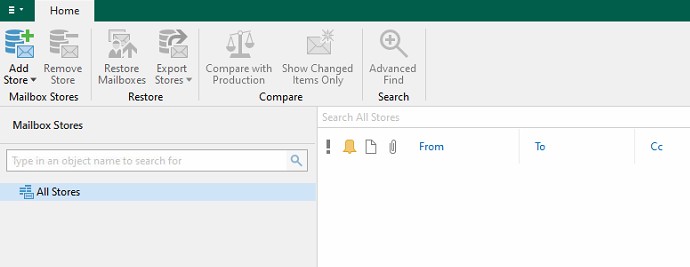
Ensuring alignment between the Mount Server environment and the original OS version resolves the issue and allows proper data visibility within the Explorer.
This case underlines the importance of compatibility checks in restore scenarios, particularly when working with newly released operating systems.

Feature of the day
Veeam Backup & Replication Web Interface (WebUI) in Version 13
With Veeam Backup & Replication v13, a new administrative access option has been introduced: the Web Interface (WebUI). Traditionally, administration of the Veeam Backup & Replication server required a Windows-based console client. This approach remains fully supported, but is now complemented by the new WebUI.
Starting with version 13.0.1, the WebUI is not yet feature-complete, but already covers a substantial set of core administrative functions. The following areas are currently supported:
- Dashboards
- Veeam Backup & Replication
- Veeam ONE Analytics
- VMware & Hyper-V backup and backup copy
- File-level recovery
- Backup Repositories & Scale-Out Backup Repositories
- Managed Servers
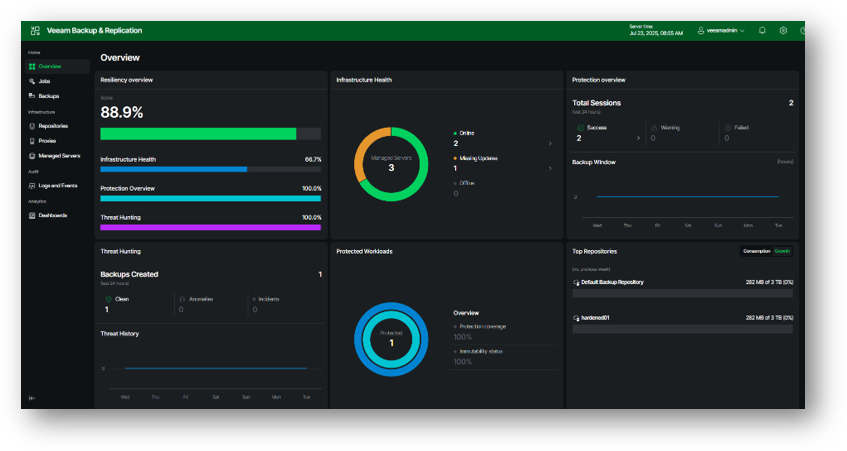
Even in this initial release, the WebUI enables administrators to perform a large portion of day-to-day management tasks. With version 13.1.0, a further expansion of available features is expected.
Additional advantages include light and dark mode support, exclusive use of port 443, and the ability to manage backup servers running different VBR versions from a single system—eliminating the need to install version-specific console clients.
Thanks for reading
I hope you enjoyed this edition of my Lessi-Learned Newsletter. Thank you for reading!
Got feedback or something you want to see in the next edition? Leave a comment, write me on X (@lessi001) or connect at LinkedIn.
Want to get the newsletter hot off the press? Sign up for my mailing list and I’ll drop a note in your inbox as soon as the latest issue is ready: