
Welcome to the “Lessi Learned” Newsletter!
In today’s edition, I take a slightly different approach and focus on two major topics that deserve closer attention.
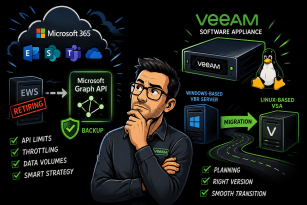
On one side, Microsoft is introducing fundamental changes in the Microsoft 365 ecosystem, particularly around data access and APIs, that have direct implications for how backup and recovery strategies should be designed going forward.
On the other, we look at the Veeam Software Appliance and, more importantly, the current migration path for organizations planning to move from a Windows-based VBR deployment to the Linux-based model.
Both topics may require timely action or at least careful planning—so it’s worth taking a few minutes to dive in.
Enjoy the read.

Newsflash
Microsoft 365 Changes Ahead
Microsoft is continuing its strategic shift toward modern, API-driven services in Microsoft 365. One of the most impactful changes currently underway is the retirement of Exchange Web Services (EWS), which has significant implications for backup and restore operations across the platform.
EWS Retirement: A Fundamental Change
EWS has long been a core technology for accessing Exchange Online data, widely used by backup solutions and third-party applications. However, Microsoft is phasing out EWS in favor of the Microsoft Graph API as the single, standardized interface for accessing Microsoft 365 services.
Once EWS is fully retired, all backup and restore operations for Exchange Online must be performed exclusively via the Microsoft Graph API. This change is not just technical, it directly affects performance, scalability, and operational planning.
For a detailed breakdown of the transition and its implications, refer to the official Veeam knowledge base article: Veeam KB4820 – EWS Retirement and Graph API Transition
API Throttling and Data Throughput Limits
While the Microsoft Graph API provides a modern and unified interface, it introduces a key constraint: API rate limiting.
Unlike EWS, Graph API usage is governed by strict throttling policies enforced by Microsoft. These limits directly impact how much data can be processed for backup and restore operations.
A practical rule of thumb is:
~1 TB of data per day (combined backup and restore) per tenant
This limitation can become a bottleneck, especially for large environments or organizations with strict recovery objectives.
Microsoft does offer options to increase these limits, potentially doubling throughput, but this typically involves additional licensing or commercial considerations. Each organization should carefully evaluate whether this investment aligns with its operational and financial goals.
Mitigating the Impact
The good news: Veeam has already adapted to these constraints.
Veeam Backup for Microsoft 365 and Veeam Data Cloud for Microsoft 365 (VDC) include several optimizations to reduce API consumption and improve efficiency:
- Selective Version Backup
Instead of backing up all object versions created since the last job, Veeam can be configured to store only the latest version. This dramatically reduces the number of API calls required and lowers data transfer volume.
- Optimized Data Handling
Incremental processing and intelligent change tracking further minimize unnecessary API usage.
Veeam Data Cloud Express
For organizations facing performance constraints, Veeam Data Cloud for Microsoft 365 with Express licenses provides a powerful alternative or Add-on.
By leveraging Microsoft’s Backup APIs, this approach enables significantly higher throughput:
Up to ~1 TB per hour for backup and restore operations
This represents a substantial improvement compared to standard Graph API limits and can be a game-changer for large-scale environments or tight backup windows.
Relevant Resources
- Veeam KB4820 – EWS Retirement and Graph API Transition
- Veeam Data Cloud for Microsoft 365 Overview
- Veeam Backup for Microsoft 365 Features
Updated Migration Path to the Linux-Based Veeam Software Appliance (VSA)
In the fast-moving stream of daily IT updates, some critical changes can easily be overlooked. One such important update affects the migration path from the traditional Windows-based Veeam Backup & Replication (VBR) server to the Veeam Software Appliance (VSA), the Linux-based deployment model.
Change in Migration Strategy
Until recently, the communicated approach was clear:
VBR version 13.1.x would serve as the primary migration vehicle for transitioning from a Windows-based VBR server to the VSA.
This has now changed.
For organizations planning to perform this migration within the current year (2026), the required version is now:
Veeam Backup & Replication 13.0.2
This means that upgrading directly to 13.1.x may not be the right step if a migration to the VSA is planned in the near term.
Guided Migration Approach
Veeam has introduced a structured and guided process to ensure smooth transitions to the VSA.
Customers interested in migrating can register via the official Veeam page:
Veeam Software Appliance Migration Registration
After registration:
- A Veeam engineer will get in touch
- Your environment will be assessed for migration readiness
- Compatibility and prerequisites will be validated
- You will receive tailored guidance and required resources for the migration
This controlled approach ensures that migrations are predictable, supported, and aligned with best practices.
What If you are not migrating in 2026?
If your organization does not plan to migrate to the VSA this year, you can proceed as usual:
Upgrade to VBR 13.1.x to benefit from the latest features and improvements
Thanks for reading
I hope you enjoyed this edition of my Lessi-Learned Newsletter. Thank you for reading!
Got feedback or something you want to see in the next edition? Leave a comment, write me on X (@lessi001) or connect at LinkedIn.
Want to get the newsletter hot off the press? Sign up for my mailing list and I’ll drop a note in your inbox as soon as the latest issue is ready: